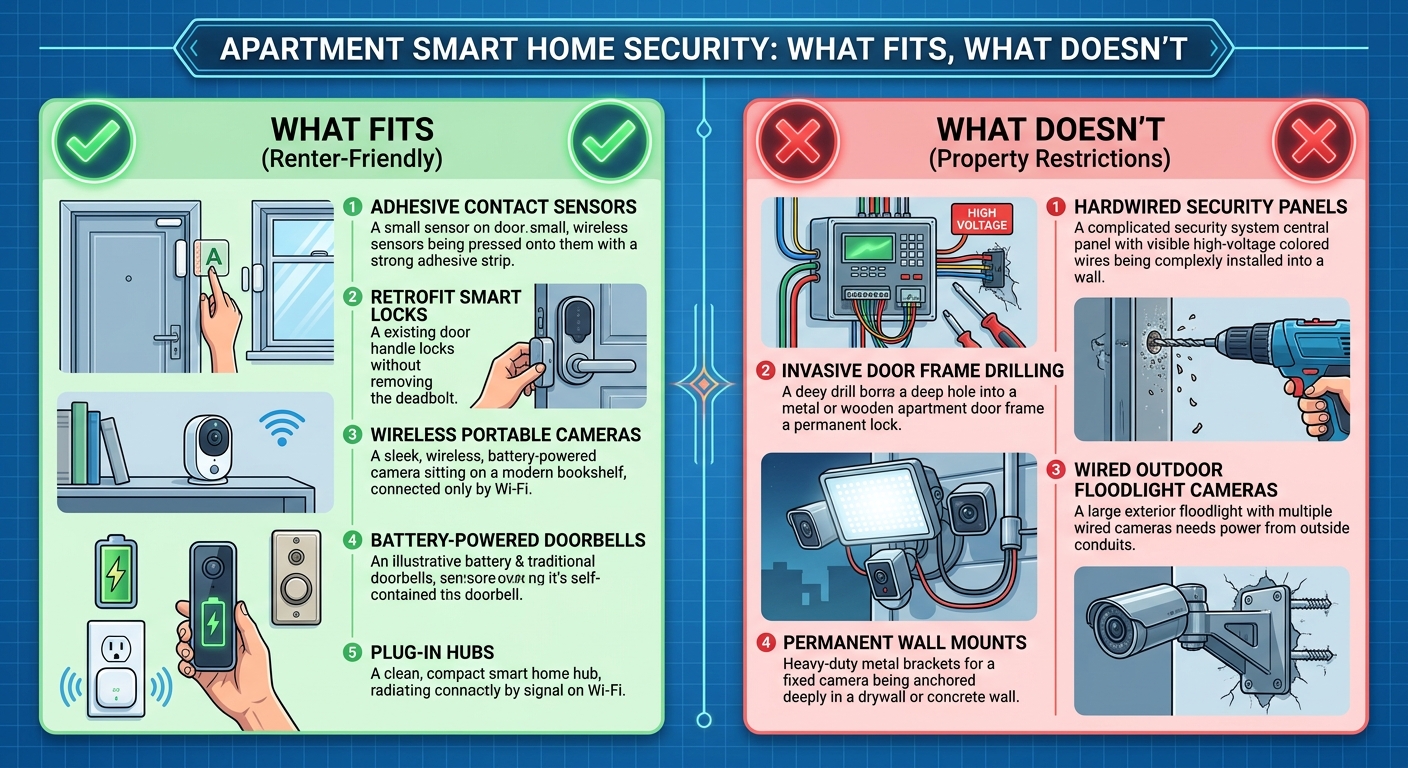
Apartment smart home security works when every device skips drilling, runs on battery or a standard outlet, and can come with you when the lease ends. That means adhesive-mount cameras, a portable base station instead of a hardwired panel, a video doorbell that clips over your existing peephole, and a retrofit smart lock that leaves the exterior cylinder alone. It runs into trouble the moment a device needs professional wiring, points a camera at a shared hallway, or assumes you own the walls it's stuck to. The rest of this guide sorts the fits from the don'ts, section by section.
Renting changes the security question before you buy a single device. A homeowner picks a system based on coverage and budget. A renter has to add a second filter first: will the lease allow it, will it survive a move, and will it annoy the neighbor on the other side of a shared wall. Skipping that filter is how a device ends up in a box in the closet six months after move-in.
What Actually Fits in a Rented Space
The devices that work in an apartment share one trait: nothing about the install is permanent. Battery or plug-in cameras that mount with adhesive strips or a small tripod on a shelf, door and window contact sensors that stick on without a screw, and a portable hub that plugs into a standard outlet instead of tying into house wiring all fall into this category. Our guide to security cameras built for renters goes through the mounting options in more detail, since "no drilling" covers a wider range of hardware than most buyers expect.
Smart plugs for lamps and small appliances are the easiest win in this category, since they add a lived-in look while you're out without touching anything structural. A retrofit smart lock, which motorizes the interior thumb-turn of your existing deadbolt while leaving the outside keyed cylinder alone, belongs here too, because it reinstalls to the original hardware in minutes if you move.
What Doesn't Fit, or Needs a Landlord's Yes First
Three categories consistently cause problems in apartments. The first is any hardwired alarm panel or hardwired siren, since those require running new low-voltage wire through a wall you don't own. The second is a camera aimed at a shared hallway, stairwell, or building entry rather than your own doorway or interior; many leases restrict recording common areas that other tenants use, and it's worth reading yours before you mount anything facing outward. The third is a siren loud enough to be heard through a shared wall, which trades a security benefit for a noise complaint from the unit next door, since a battery siren's volume is not something most product pages state plainly.
If your building's setup calls for tying into an existing wired intercom, a shared fire panel, or any circuit behind a wall plate, that's the point to stop and call a licensed installer rather than open anything up yourself. Our comparison of DIY vs professional security installation walks through exactly where that line sits, device by device.
The Apartment Wi-Fi Problem Nobody Mentions
A single-family home usually has one Wi-Fi network competing for airspace. A multi-unit building can have dozens of networks stacked on the same few 2.4GHz channels, which is the most common reason apartment renters see cameras drop offline or sensors report "unreachable" more than a house across town would. Before adding several smart devices, it's worth putting them on their own guest network rather than the one your laptop and phone use, both for the connection stability and so a compromised camera can't see the rest of your traffic. Our guide to securing your Wi-Fi before adding smart home devices covers the setup step by step.
The Smart Lock Question: What You Can Change on a Rented Door
Most leases are fine with a retrofit smart lock because it doesn't alter the door, the frame, or the exterior keyway; you keep the original deadbolt hardware in a drawer and swap it back at move-out. A full lock replacement, where the entire deadbolt body is swapped for a new one, is a different conversation and usually needs the landlord's sign-off first, since it changes what fits the door and who can get a copy of the key. Our breakdown of what you can safely change on a rented door separates the retrofit option from full replacement so you know which one you're actually buying before it arrives.
The Privacy Trade-off Nobody Leads With
Every camera and doorbell in this category is also a data collection device, and that trade-off gets less attention than the mounting question. The Federal Trade Commission's guidance on internet-connected devices notes that in a survey of smart products, nearly 89% failed to disclose on their own websites how long the device would keep receiving security updates, which matters because a camera that stops getting security patches is a camera an outsider can potentially access longer than the box promised (FTC, Internet of Things, read 2026-09-18). Before buying, check the manufacturer's own site for how long updates are promised and what the self-monitoring option looks like without a subscription; SimpliSafe's own site, for example, lays out a no-long-term-contract, self-monitoring model as a standard option rather than an add-on (SimpliSafe, read 2026-09-18), which is the kind of detail worth confirming on the maker's page rather than assuming.
In an apartment specifically, the field of view matters more than usual. A camera angled to cover your own door can also catch a neighbor's welcome mat, a shared landing, or people passing by who never agreed to be recorded. Narrowing the field of view to your own threshold, checking what the app's privacy dashboard actually shares, and reading the retention settings before accepting the defaults are the parts of setup that take five minutes and prevent the most avoidable complaint, well before anyone actually knocks on the door.
What a Smart Camera Notification Is (and Isn't)
A phone alert that a sensor tripped is useful, but it is not a response, and it is not a substitute for calling for help. If you're ever facing an active break-in, a fire, or a medical emergency, call 911 or your local emergency number first; a camera can hand over footage afterward, but it cannot intervene, and treating a notification as protection on its own is the false sense of security this category tends to sell. That distinction matters more in an apartment than a detached house, since response times and building access for emergency services can differ from what you'd expect on a single-family street.
Apartment Smart Home Security Checklist Before You Buy
- Confirm your lease's stance on cameras facing shared spaces before you mount anything outward-facing.
- Pick devices that mount with adhesive or a standard outlet, not anything that needs a wall opened.
- Put smart devices on a separate guest Wi-Fi network rather than your main one.
- Choose a retrofit lock over a full replacement unless the landlord has already agreed to the swap.
- Check the manufacturer's own site for how long software updates are promised before you buy.
- Keep original hardware (door lock cylinder, doorbell wiring) boxed for move-out.
None of this requires the biggest system on the market. It requires matching the device to a space you don't own outright, which is a different filter than the one most buying guides apply.
FAQ
Do I need my landlord's permission for a video doorbell? It depends on whether it replaces existing low-voltage doorbell wiring or mounts separately, and on what your lease says about exterior modifications. A battery-powered doorbell that clips over or beside the existing unit without removing anything is the lower-friction option; ask first if the plan involves removing the original doorbell.
Will an apartment security system void my security deposit? Adhesive-mount and battery-powered devices are designed to remove without residue or holes, which is why they're the default recommendation for a rental. Drilling, running new wire, or replacing a lock body are the actions most likely to raise a deposit question, so they're the ones worth clearing with the landlord first.
Can I take my smart home security system with me when I move? Yes, that's the main advantage of the DIY, adhesive-mount category over a professionally installed system: the hub, cameras, and sensors go back in a box and reinstall at the next address in about the same time it took to set them up the first time.
Do apartment smart home security systems need a monthly fee? Not necessarily. Many systems in this category offer a self-monitoring option where you receive the alerts yourself with no subscription, and a paid professional monitoring tier as an optional upgrade rather than a requirement; check the specific product's own page for which model it uses.
What's the single biggest mistake renters make with smart security? Pointing a camera at a shared hallway, landing, or entry that other tenants use, rather than their own door or interior. It's the one setup choice that turns a personal security device into a shared-space privacy question, and it's worth checking your camera's actual field of view against your lease before you finish setup.

I’m John Smith, the founder of Homegadgetguru.com. I use my IT background to extensively test home automation setups in my own house, giving you the hands-on, practical advice you need to build a smarter, more connected home.