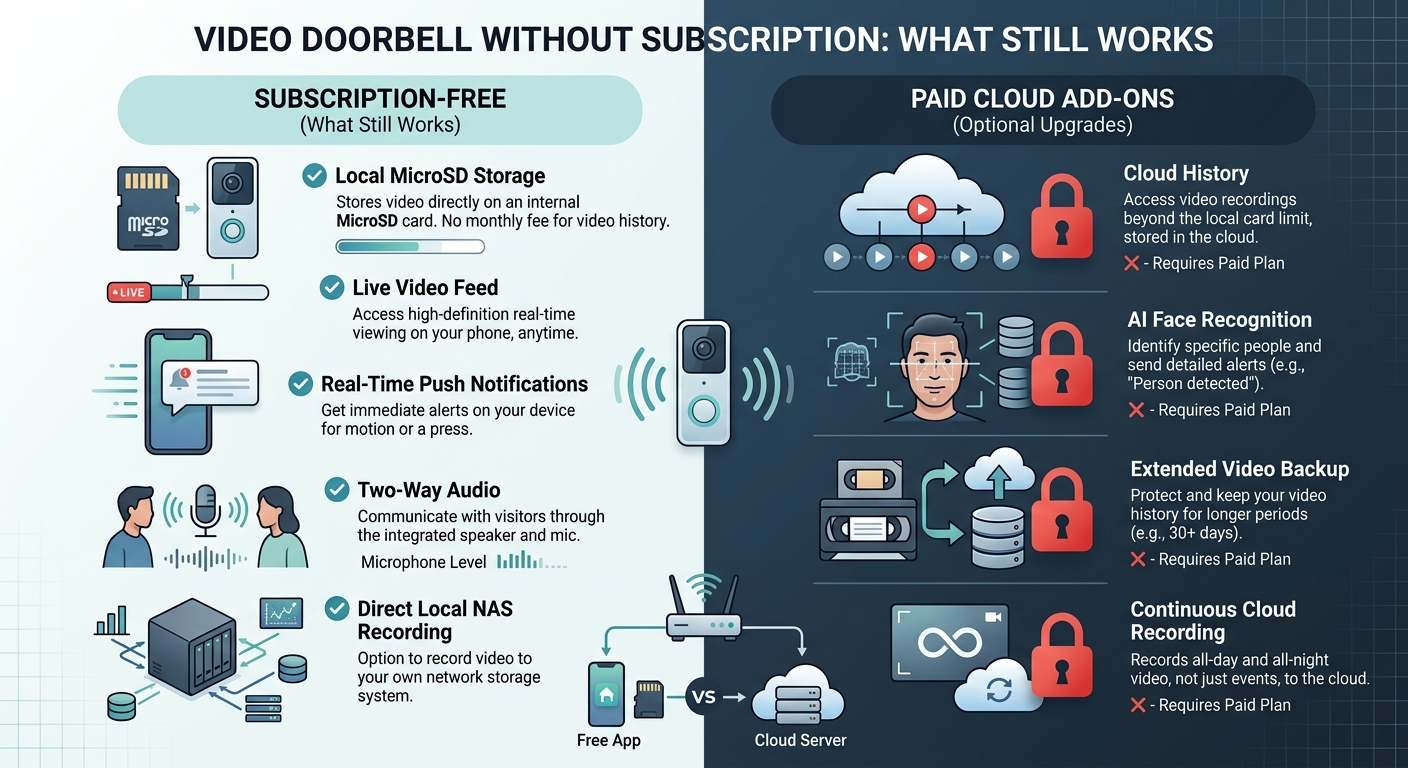
A video doorbell without subscription still does three things on most brands: live view on demand, real-time motion push alerts, and two-way talk through the app. What disappears without a paid plan is recording. A cloud-only doorbell shows the moment as it happens and then remembers nothing, so there is no clip to replay after a missed delivery. The workaround is a doorbell built with its own local storage, a memory card or built-in chip, which keeps recording without a monthly fee at all.
That distinction, live features versus recorded ones, is the whole story most product pages bury under specs. This guide separates what a subscription unlocks from what the hardware already does on its own, and where the real trade-off sits once recording moves off the manufacturer's cloud and onto a card in the doorbell itself.
What Still Works With No Plan At All
Across the major brands, the doorbell still rings and the app still opens to a live feed the moment someone presses the button or triggers motion. According to Ring's own support blog on using its doorbells without a paid plan (read 2026-09-18), live view, real-time motion alerts, two-way talk, customizable motion zones, and Alexa integration for pulling up the feed on a smart display all stay free. Device health checks, like battery level and Wi-Fi signal strength, also keep working without a subscription on most models.
In practice, this covers the moment-to-moment use most households actually want a doorbell for: seeing who is outside right now, telling a courier where to leave a package, or checking that a kid got home. None of that requires a monthly fee anywhere in the current market. What it does not cover is anything that happens after the live moment passes.
What a Video Doorbell Without Subscription Stops Doing
The gap shows up the instant someone wants to look back. Without a paid cloud plan, a cloud-dependent doorbell has nothing to show for anything that happened five minutes ago, because it never saved the video in the first place. Ring's own description of its free tier confirms video recording, clip storage, and snapshot capture are all locked behind a subscription, and smarter detection, telling a person apart from a package or a passing car, is a paid-tier feature as well. Miss the push notification because the phone was on silent, and there is nothing left to check later.
This is the part a lot of buyers do not learn until after the doorbell is already installed. A doorbell can look identical on the shelf whether it needs a subscription to be useful or not, because the hardware supports both models and the box rarely spells out which parts of the feature list require ongoing payment.
The Local-Storage Route: Recording Without a Monthly Fee
The actual subscription-free path is a doorbell that records to its own storage instead of the manufacturer's servers. Several current battery and wired doorbells accept a memory card, or ship with a built-in storage chip, and save clips onto that hardware the moment motion is detected, with no cloud plan involved. A few battery models pair with a separate hub that holds the storage instead of the card living in the doorbell itself.
The trade-offs move rather than disappear. A card-based or hub-based system means the footage lives in the house, so it survives an internet outage that would otherwise cut a cloud camera off entirely, and reviewing it does not depend on a subscription staying active. It also means there is no offsite backup: if the doorbell is stolen, or the card fails, that footage is usually gone unless it was already pulled off manually. Card capacity, retention length, and whether the storage records continuously or only on motion vary by model and generation, so that is worth checking on the specific product's own spec page before buying rather than assuming it matches a similar-looking model.
The Trade-Off Nobody Puts On The Box
Cloud storage and local storage are not just a cost decision, they are a privacy decision, and the 2023 FTC case against Ring's parent company is the clearest documented example of why. The FTC's consumer alert on Ring's privacy failures (read 2026-09-18) describes how gaps in Ring's internal controls let employees and outside attackers access customers' stored video, including footage from cameras placed in bedrooms and bathrooms, over several years before the company tightened access. A local-storage doorbell cannot have that exact failure mode, because the footage never leaves the house to sit on a company's servers in the first place. It creates a different one instead: the household's own network and the doorbell's own account become the entire security boundary, with no vendor-side monitoring behind them.
That shifts the work rather than removing it. A subscription-free doorbell is still an internet-connected camera on the home network, so the basics that keep any smart camera from being someone else's problem still apply: a strong, unique account password, two-factor login where the app offers it, and a home network that is not running on default settings. This site's guide to securing home Wi-Fi before adding smart devices covers the router-level basics that matter regardless of which doorbell ends up at the door, and the camera account security and two-factor login guide covers the account side specifically, which is the part a subscription-free setup leans on more heavily since there is no company support team actively watching for account misuse.
Renters and No-Drill Installs Often Land Here Anyway
A lot of subscription-free doorbells are also battery-powered and mount without hardwiring, which lines up closely with what a renter can actually install without violating a lease. If that is the starting constraint, this site's guide to security cameras for renters that need no drilling walks through what a rental setup can and cannot change at the door and around the unit, which overlaps heavily with the no-subscription, battery-and-card category of doorbell.
Before buying based on any privacy claim on the packaging, it is worth checking what the company's own privacy policy actually says it collects and keeps, since "no subscription required" describes the storage model, not the company's data practices around the account, the app, or diagnostic data. The smart home privacy policy guide on this site walks through what to look for in that document before assuming "subscription-free" means "the company sees nothing."
A Quick Way To Decide
| If the priority is… | A subscription-free setup handles it because… |
|---|---|
| Seeing who is at the door right now | Live view and two-way talk stay free on nearly every current brand |
| Reviewing yesterday's missed delivery | Only a local-storage model or a paid cloud plan saves anything to look back at |
| Telling a person apart from a passing car | Smart detection is a paid-tier feature on most brands regardless of storage type |
| Keeping footage working through an internet outage | Local storage keeps recording; cloud-only recording stops with the connection |
| Avoiding a recurring bill entirely | A card-based or built-in-storage doorbell is the only route that avoids one long-term |
If Something Actually Happens At The Door
A video doorbell, subscription or not, is a documentation and awareness tool. It is not a substitute for calling for help, and no rating or feature list makes it one. If there is an active break-in, a threat, or anyone in danger, the right first step is calling 911 or the local emergency number, not opening the app to check the feed. Footage from either a cloud plan or a local card can matter afterward, for a police report or an insurance claim, but it does not intervene in the moment, and a doorbell should never be sold or bought on the idea that it does.
FAQ
Does a video doorbell record anything without a subscription? Only if it has its own storage, a memory card or a built-in chip, or pairs with a local hub. A cloud-only doorbell shows live video without a plan but does not save any of it.
Can I still get motion alerts without paying anything? Yes, on most current brands. Real-time motion push notifications are one of the features that stays free even on subscription-based cloud doorbells, based on how the major brands structure their free tiers.
What does a subscription actually add if I already have local storage? Typically cloud backup that survives the doorbell or its card being damaged or stolen, plus smarter detection features like telling a person apart from a delivery vehicle, and sometimes a longer or offsite copy of the recorded history.
Is a subscription-free doorbell less secure than a cloud one? It shifts the risk rather than removing or adding to it. A local-storage doorbell cannot be exposed the way a cloud provider's servers can, but it depends entirely on the home network and account password being solid, since there is no company-side monitoring layer behind it.
Do local-storage video doorbells still need Wi-Fi? Yes. Live view, push alerts, and app access all still need a working internet connection even when the actual video recording happens on a local card rather than in the cloud.

I’m John Smith, the founder of Homegadgetguru.com. I use my IT background to extensively test home automation setups in my own house, giving you the hands-on, practical advice you need to build a smarter, more connected home.