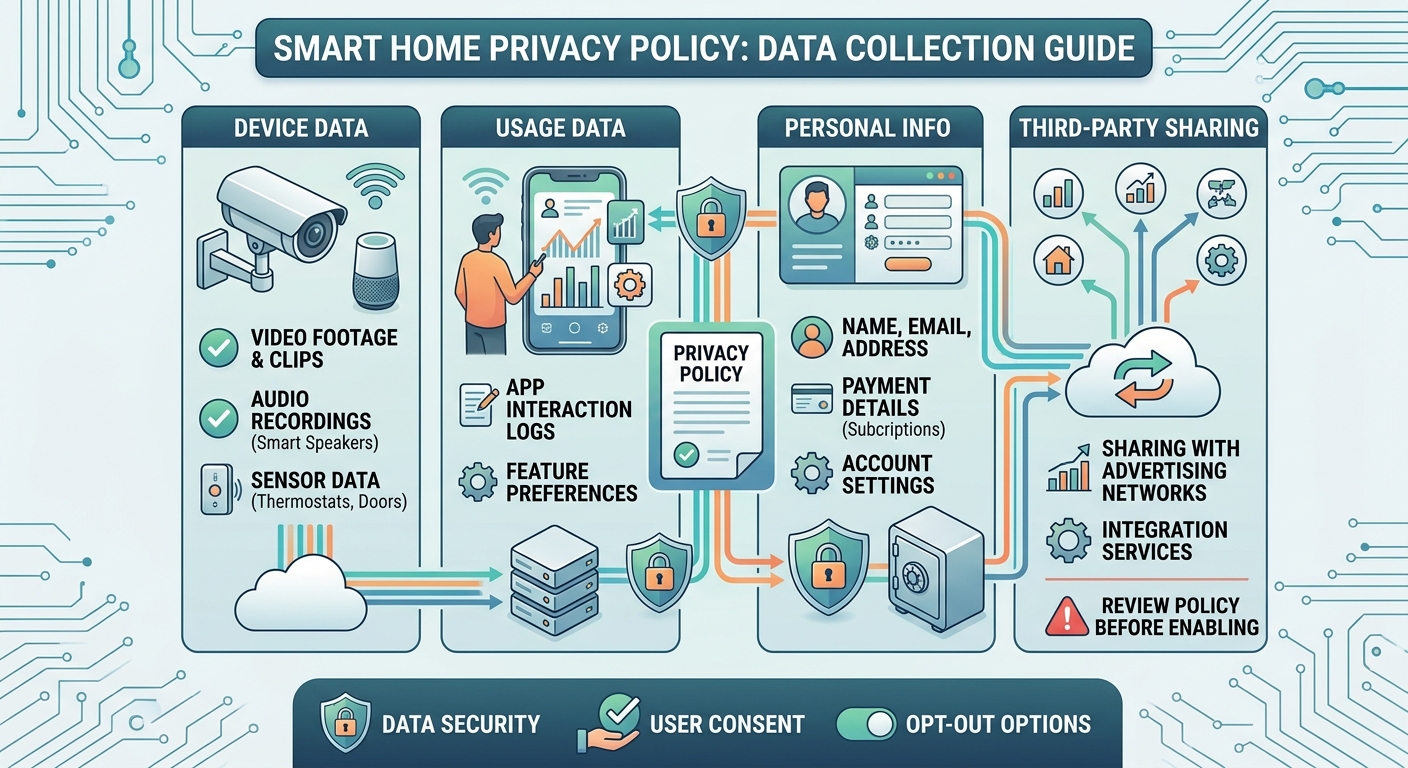
A smart camera or device's privacy policy typically covers several categories of data: identity information such as an email or phone number, payment details, location, device and usage data, and in some cases audio. What a policy actually does with that data, how long it is kept, and whether processing happens locally or in the vendor's cloud varies by product. Local-only processing generally means less data leaves the home network in the first place.
The rest of this guide names the categories in full, the pattern most policies use to undersell what they mean in practice, and the single lever, local versus cloud processing, that a reader can actually act on. This piece covers the vendor-data layer only. Whether a camera can be hacked outright is a separate question this site answers in whether Wi-Fi security cameras can be hacked. What the network underneath your devices needs is covered in securing your home Wi-Fi before you add a single security device, and the account-level protections on top of a device are covered in camera account security: passwords, two-factor and shared logins.
The Categories of Data Most Camera and Smart-Device Apps Ask For
Independent reviews of smart camera and smart-device privacy policies consistently describe the same handful of categories, even though the exact scope differs from product to product. Identity information is close to universal: an email address or phone number is usually required just to create the account in the first place. Payment information follows for any product involving a subscription or cloud plan. Location data ranges from a general region, useful for setting a time zone or finding nearby customer support, to precise GPS-level location, which some companion apps request for reasons that are not always obvious from the app itself.
Device and usage data covers things like what model you own, how often you open the app, which features you use, and diagnostic information sent back for troubleshooting. Some products, mainly cameras and anything with a microphone, also collect audio, and this is the category worth reading about most carefully, since audio recording policies vary widely in how they are described and what a "may record audio" setting actually triggers.
None of this is unusual for a connected product, and none of it is inherently alarming on its own. What matters is not that these categories exist, but what a specific policy says happens to the data once it is collected.
Where a Privacy Policy Usually Undersells What It Means in Practice
Here is the pattern worth knowing before reading any specific policy: the most consequential sentence in a typical privacy policy is often the shortest and easiest one to skim past. A phrase like "we may share data with service providers to operate our services" sounds routine, almost procedural. In practice, it is the sentence doing the most work, because "service providers" can include cloud hosting companies, customer support platforms, analytics vendors, and advertising partners, all covered by one vague phrase that names none of them specifically.
This is not unique to any one company; it is a pattern across the industry, largely because privacy policies are written to be broad enough to cover current and future business arrangements without needing constant revision. The practical takeaway for a reader is to slow down specifically at any sentence involving the words "share," "third party," "partners," or "service providers," since that is where a policy's real scope usually lives, not in the section that lists what data is collected.
Local-Only Processing vs Cloud Processing, and Why That Changes the Answer
This is the single most useful lever a reader actually has. A device that processes video or audio locally, on the device itself or on a base station in the home, does not send that data to the manufacturer's servers by default. A device that relies on cloud processing, for features like person detection, searchable video history, or remote viewing from anywhere, generally does send data off the home network to make those features work.
Neither approach is simply "safer" in every respect. Local-only processing keeps more data inside the home, which limits what a company could access or be compelled to share even if it wanted to. It typically comes with fewer cloud-dependent features and, if the device or its storage is physically taken, the footage can be lost along with it. Cloud processing enables features that are hard to replicate locally and typically includes off-site backup, but it depends on trusting the vendor's handling of that data and its own security practices. This site's guide to local vs cloud camera storage is the closest companion piece on where footage and data actually live, and covers the full cost and reliability tradeoff, not just the privacy angle covered here.
Three Sections Worth Actually Reading Before You Buy
A full privacy policy is long, and most people reasonably do not read every word of one before buying a product. Three sections are worth the few minutes it takes, specifically because they answer the questions that matter most in practice.
The data sharing section answers who else gets access to your data beyond the company itself, and this is where vague language about "partners" or "service providers" deserves a second look. The data retention section answers how long footage, audio, or account data is kept, since a policy that never states a retention period is effectively saying "indefinitely" by omission. The local versus cloud processing description, sometimes found in a product's technical specifications rather than the privacy policy itself, answers whether your data leaves the home network in the first place for the features you actually plan to use.
Reading just these three sections, rather than the entire document, gets a reader most of the practical information a full read would provide, in a fraction of the time.
Where This Connects to Account Security and Network Hardening
Reading a privacy policy answers what a company can see and do with your data once it is collected. It does not address two separate layers this site covers elsewhere. Whether the account behind the app itself is protected, through a unique password, two-factor authentication, and per-user access for shared households, is a separate question answered in camera account security: passwords, two-factor and shared logins. Whether the home network carrying that data is reasonably hardened in the first place, before any of this data ever reaches a router, is answered in securing your home Wi-Fi before you add a single security device. If you are choosing devices for the first time rather than auditing what you already own, this site's guide to a smart home security system with no monthly fee covers the full layered build these three questions all sit underneath.
Each of these three questions, what the network exposes, what the account protects, and what the company collects, is a different layer with a different fix. Reading a privacy policy is the piece most buying guides skip entirely, and it is worth doing before deciding among products rather than after.
FAQ
Do I need to read the whole privacy policy before buying a smart camera? Not necessarily. Focus on the data sharing section, the retention section, and any description of local versus cloud processing. These three answer most of the practical questions a full read would.
What does "local-only processing" actually mean for my privacy? It generally means video, audio, or other data stays on the device or a base station in your home rather than being sent to the company's servers by default, which limits what the company could access. It typically comes with fewer cloud-dependent features in exchange.
Is cloud storage automatically less private than local storage? Not automatically. Cloud storage depends on trusting the vendor's data handling and security practices, while local storage keeps data closer to home but can be lost if the physical device or storage is taken. They carry different tradeoffs rather than one being simply safer.
What is the most important sentence to look for in a privacy policy? Language about sharing data with "service providers," "partners," or "third parties." This is usually where the real scope of who can access your data lives, even though it often reads as routine boilerplate.
Does reading a privacy policy tell me if my account or network is secure? No. A privacy policy explains what a company collects and does with data. Account security, like two-factor authentication, and network security, like router hardening, are separate layers covered elsewhere on this site.

I’m John Smith, the founder of Homegadgetguru.com. I use my IT background to extensively test home automation setups in my own house, giving you the hands-on, practical advice you need to build a smarter, more connected home.