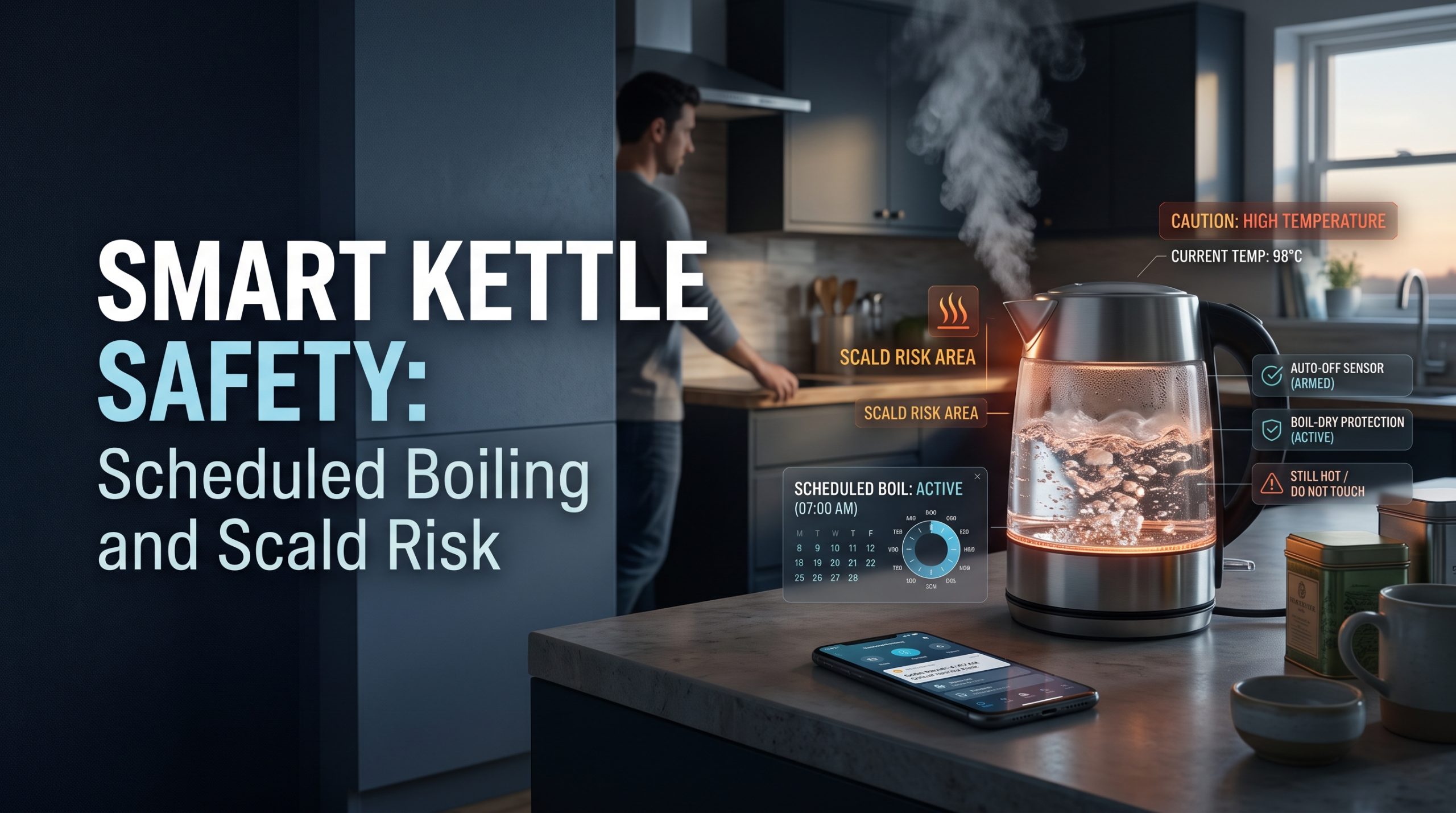
Short answer: Smart kettle safety rests on two facts. Water from a kettle is hot enough to scald in an instant, and a connected kettle can heat that water when nobody is standing next to it. The protections that matter most, automatic shut-off, boil-dry protection and a stable base, work the same on a smart kettle as on an ordinary one. What the app adds is a new kind of risk: a schedule or remote start that boils water you are not there to watch. Use scheduling only when someone will be in the kitchen soon after, keep the kettle and cord back from the counter edge, and treat a keep-warm mode as a jug of very hot water waiting for someone to bump it.
Instant-hot taps and countertop hot water dispensers raise the same question in a different shape. They keep near-boiling water ready all the time. This guide covers both, independently and without ranking brands.
Why kettle heat deserves more respect than it gets
A kettle feels like the most harmless appliance in the kitchen. It has one job, it switches itself off, and most people use it without thinking. The risk is not that the kettle will catch fire. It is that the water inside it is far hotter than anything else that comes out of a household tap.
For comparison, the American Academy of Pediatrics' guide to treating and preventing burns (read October 2, 2026) advises adjusting a water heater "so the hottest temperature at the faucet is no more than 120 degrees Fahrenheit (48.9 degrees Celsius) to prevent scald burns." Water from a kettle that has just boiled is close to 212°F at sea level, far above that guideline.
The same AAP page also advises people to "avoid carrying your baby and hot liquids like coffee, tea or soup at the same time." That points to the practical heart of kettle safety: the hazard is hot water that spills, splashes or tips, and most of what keeps people safe happens around the kettle rather than inside it.
What a smart kettle adds, and what it does not
A smart kettle is an electric kettle with a connection, usually Wi-Fi or Bluetooth, and an app or voice assistant on top. The heating element, the base and the shut-off are the same kinds of parts found in a non-connected kettle. The differences are in control.
| Smart feature | What it does | Safety view |
|---|---|---|
| Variable temperature | Heats to a chosen temperature below boiling | Neutral. Lower settings are still hot enough to scald |
| Keep warm or hold | Holds water at a set temperature for a period | Leaves a full kettle of hot water on the counter for longer |
| Boil alerts | Sends a notification when water is ready | Helpful. Fewer trips back to check |
| Scheduling | Starts heating at a set time | The main new risk if nobody will be there |
| Remote start | Starts heating from your phone, anywhere | Removes the moment where you see the kettle before it heats |
| Voice control | Starts heating by voice command | Similar to remote start if triggered from another room |
The features that genuinely help, such as alerts and precise temperatures, do not create risk. The features that move the start of heating away from the person in the kitchen are the ones to think about.
Smart kettle safety features that actually matter
Before any app feature, check the basics. These apply to every electric kettle, and they are the ones doing the safety work.
- Automatic shut-off. The kettle switches off when the water reaches temperature. This is common on electric kettles, but confirm it in the manual.
- Boil-dry protection. The kettle cuts power if it is switched on with too little water. As one example, Cosori's description of its smart gooseneck kettle (read October 2, 2026) says that "if there's less than ½ cup / 118 mL of water in the kettle, the kettle will automatically turn off." Thresholds differ between models, so read your own manual rather than assuming.
- A stable, cordless base. The kettle lifts off the base, so the cord stays put while you pour.
- A lid that locks. A lid that pops open when the kettle tips is a splash risk.
- A short or stowable cord. Cord storage under the base keeps a loop of cable from hanging over the counter edge.
- A listing mark from an independent testing laboratory on the kettle or its packaging, which shows the product was evaluated against a recognized safety standard.
We have not tested specific kettles, so this is a checklist, not a ranking. A kettle that has all of these and no app at all is a sound choice. A smart kettle missing one of them is not made safer by its app.
Scheduling and remote start: where the real risk sits
Some smart kettles let you schedule a boil. Cosori's same product page says you can "schedule when you want the kettle to start boiling," and that in keep-warm mode "it will stay at the target temperature for 60 minutes," with the hold time adjustable in its app. These are reasonable features. They also mean a kettle can heat a full load of water, then hold it hot for an hour, without anyone in the room.
The U.S. Fire Administration's cooking fire safety guidance (read October 2, 2026) reports that "the leading factor contributing to ignition in nonconfined home cooking fires was unattended equipment (37%)." A kettle with working shut-off is not a pan of oil, and that statistic is about cooking fires, not kettles. The lesson still carries over: heat plus nobody present is the combination to manage.
A sensible rule set for scheduled and remote boiling:
- Schedule only for a time when someone will be in the kitchen within minutes, such as just before your alarm goes off.
- Fill the kettle the night before, between the minimum and maximum marks, and seat it properly on the base.
- Keep the hold time short. The app's default may be longer than you need.
- Use remote start only when you are already home and know the kettle has water in it.
- Turn remote access off if you never use it. Scheduling on the kettle itself does not need it.
If any of those cannot be guaranteed on a given day, skip the schedule. Boiling the kettle by hand takes a few minutes.
Why an ordinary kettle should not go on a smart plug
It is tempting to make an old kettle "smart" with a smart plug. Many guides to smart plugs in the kitchen warn against heating appliances, and for good reason. A kettle with a mechanical switch, left switched on, will start heating whenever the plug restores power: on schedule, by accident in the app, or when power returns after an outage. It was designed on the assumption that a person flicks that switch.
The U.S. Fire Administration's appliance and electrical fire safety guidance (read October 2, 2026) advises: "Unplug small appliances when you are not using them." A smart plug that keeps a kettle armed and ready to heat is the opposite of that. If you want scheduled hot water, choose a kettle with scheduling built in by its maker and follow its manual.
Placement, cords and children
Where the kettle sits matters more than which app it uses.
- Keep it back from the counter edge, on a flat, dry surface, away from where people reach across.
- Keep the cord short and out of reach. A hanging cord is something a child can pull and an adult can catch with a sleeve.
- Plug it straight into a wall outlet. The same USFA guidance warns "do not overload power strips." A kettle draws a lot of power, so give it its own outlet rather than sharing a strip with a toaster or air fryer.
- Keep it away from the sink edge and wet hands.
- Pour away from yourself and other people, and keep hands and faces clear of the steam from the spout.
For households with young children, an older relative or anyone with limited grip or balance, the most sensible kettle setup is often the most boring one: a lighter kettle, filled only as much as needed, used by one person at a time. Our guide to smart home safety for aging parents looks at how connected devices can help, and where they add complication, in an older person's home.
Instant-hot devices: a different shape of the same risk
Instant-hot devices come in two common forms: countertop hot water dispensers that hold heated water in a tank, and under-sink systems that feed a dedicated hot tap at the sink. Both remove the wait. Both also keep very hot water ready around the clock.
InSinkErator's instant hot water dispenser page (read October 2, 2026) describes a digital tank that lets you "select the precise water temperature between 190°F and 210°F," and a standard tank delivering "up to 208˚F water." It also describes a "safety spring lock push down lever" that "immediately springs back into place as soon as it is released," so hot water is not left running.
That self-closing design is the key safety feature to look for on any instant-hot tap. A tap that can be left open, or that a child can operate with one push, changes the risk considerably.
Installation is where an instant-hot tap stops being a gadget decision. The same InSinkErator page lists an "undersink electrical outlet" among the requirements. If there is no outlet under your sink, stop there: adding one is a job for a licensed electrician, not a do-it-yourself task. Connecting a tank to the water supply means working on a pressurized line. Follow the manufacturer's installation manual for your exact model, and call a licensed plumber if the connection involves anything beyond what that manual describes or if your local code requires it.
Smart kettle vs instant-hot tap: how the risks compare
| Question | Smart kettle | Instant-hot tap or dispenser |
|---|---|---|
| When is water hot? | Only when heated, plus any keep-warm time | All the time, in the tank |
| Main spill risk | Tipping or pulling the kettle off the counter | Splashing under the spout, or hands under the stream |
| Who can operate it? | Anyone who can reach and lift it | Anyone who can reach the lever |
| Unattended heating | Possible with schedules or remote start | Constant, by design, inside a closed tank |
| Install | Plug-in | Under-sink outlet and water connection |
Neither is automatically safer. A kettle concentrates the risk into a few minutes a day. An instant-hot tap spreads it across the whole day but removes the need to carry a heavy jug of boiling water.
If someone is scalded
The AAP's burns guide advises that "as quickly as possible, soak the burn in cool water." It adds that "for anything more serious than a superficial burn, or if redness and pain continue for more than a few hours," parents should contact their pediatrician, and that "burns of the hands, mouth, or genitals should get immediate medical attention." For adults, a doctor, urgent care or emergency services make that call, depending on how serious the burn looks.
The network side of a connected kettle
Remote start means the kettle is reachable through an online account. A weak password on that account is a small but real way for someone else to control an appliance that heats water in your home. Use a unique password and two-step login where the app offers it; our guide to account security and two-factor login, written for cameras, applies to any smart appliance app. Our walkthrough on securing your Wi-Fi before adding smart home devices covers the network itself. Keep the kettle's app and firmware updated, too.
A sensible smart kettle setup
- Choose a kettle with automatic shut-off, boil-dry protection, a locking lid and a cordless base.
- Give it its own wall outlet, back from the counter edge, with the cord stowed.
- Use scheduling only for times when someone will be up soon after, and keep the hold time short.
- Leave remote start off unless you have a real use for it.
- If you add the kettle to a wake-up routine, pair it with lights or music so someone heads to the kitchen, as in our guide to simple routines to automate your morning.
For a wider look at which connected kitchen devices earn their place, see our overview of smart kitchen gadgets that change the way you cook.
FAQ
Is it safe to schedule a smart kettle to boil in the morning?
Scheduling is a feature some makers build in, and it is reasonable when someone will be in the kitchen soon after the water heats. Fill the kettle the night before, seat it on its base, keep the hold time short, and skip the schedule on days nobody will be there.
Do smart kettles have boil-dry protection?
Many do, as do many ordinary electric kettles, but it is not universal and the cut-off threshold varies. Check the manual for your exact model rather than assuming.
Can I put my regular kettle on a smart plug?
It is not a good idea. A kettle with its switch left on will start heating whenever the plug turns on, including by accident or after a power cut. Choose a kettle with scheduling designed in by its maker instead.
Are instant hot water taps safer than kettles?
Not automatically. They remove the need to carry boiling water, but they keep near-boiling water ready all day. Look for a self-closing hot lever, and have any new under-sink outlet installed by a licensed electrician.
What does the AAP say to do after a scald from a kettle?
The American Academy of Pediatrics advises soaking the burn in cool water as quickly as possible, contacting a pediatrician for anything more than a superficial burn, and getting immediate medical attention for burns of the hands, mouth or genitals.

I’m John Smith, the founder of Homegadgetguru.com. I use my IT background to extensively test home automation setups in my own house, giving you the hands-on, practical advice you need to build a smarter, more connected home.